Snoozed List
The Snoozed List contains recommendations that have been temporarily deferred.
It helps you pause actions without losing visibility, so you can revisit them when needed.
Why Snooze?
Use Snooze for resources that are:
- Required for compliance or DR
- Used occasionally
- Not ready for action yet
This helps keep your active recommendations clean and focused.
Overview
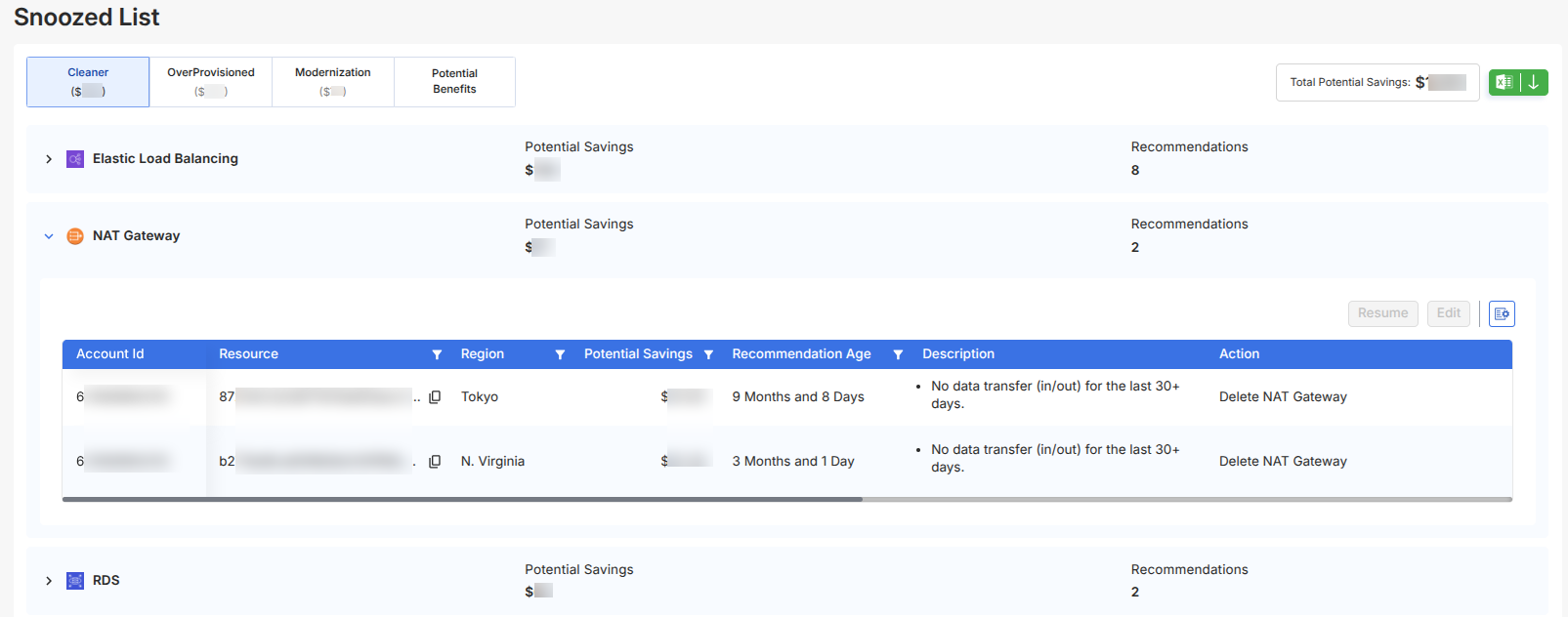
All snoozed recommendations are organized using the same structure as Insights:
- Cleaner
- OverProvisioned
- Modernization
- Potential Benefits
Each tab shows:
- Total Potential Savings
- Services with snoozed recommendations
- Recommendation counts per service

Service-Level View
Within each tab, recommendations are grouped by service.
Each row displays:
- Potential Savings
- Number of Recommendations
You can expand a service to view detailed recommendations.
Detailed Recommendations
Expanding a service shows all snoozed items in a table:
- Account ID & Resource
- Region
- Potential Savings
- Recommendation Age
- Description
- Action
Each snoozed recommendation also stores additional context:
- Snooze Expiry Date – When the recommendation will reappear
- Snoozed By – User who snoozed the recommendation
- Initiated Date – When it was snoozed
- Snooze Reason – Optional explanation for deferral

Available Actions
Resume
Reactivates a snoozed recommendation.
- Moves the recommendation back to the active list (Insights)
- Makes it available for action again
Edit Snooze
Modify snooze settings for a recommendation.
- Update snooze duration or reason
- Useful when timelines or priorities change