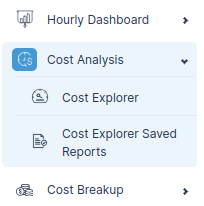
Cost Explorer Saved Reports
The Saved Reports feature lets you preserve detailed cost analyses you've built using Cost Explorer so you can quickly revisit and share them with your team without needing to reconfigure filters or groupings.
This feature makes your cost analyses repeatable, efficient, and collaborative, helping teams stay aligned and make data-driven decisions faster.
Key Features
- Save Filtered Views: Save any view with applied filters and groupings for future analysis.
- Flexible Groupings: Keep your configurations by Service, Tags, Resource, Instance Type, Account ID, etc.
- Date Range Flexibility: Support for custom, monthly, or multi-month time ranges.
- Granular Filters: Retain all advanced filters, including Service, Usage Type, Platform, API Operation, Purchase Option, and more.
Example Use Cases
- Analyze monthly cost trends for specific regions.
- Track API-level costs to troubleshoot unexpected spikes.
- Share pre-configured cost views with finance or engineering teams.
- Maintain different chart types (bar, line, stacked) for different reporting needs.
Accessing Your Saved Reports