Reservation Summary
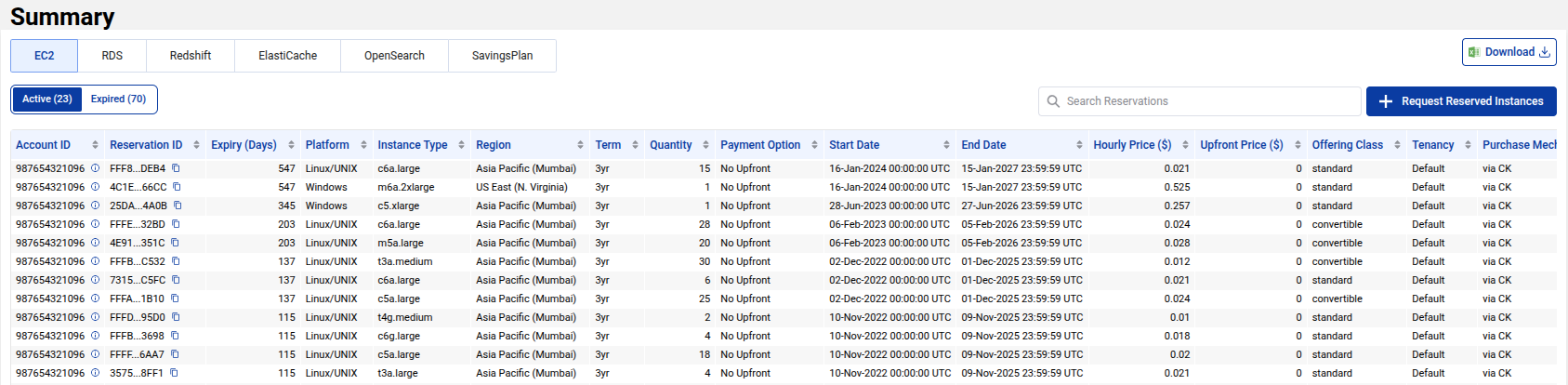
The Reservation Summary page provides an overview of all your active and expired Reserved Instances across AWS services like EC2, RDS, ElastiCache, Redshift, OpenSearch, and Savings Plan. It allows users to track and manage the reservations for compute resources in their cloud environment.
This page helps you to stay on top of reserved capacity, monitor expirations, and view pricing details such as Hourly Price, Upfront Price, and Quantity. The table view displays all key details and enables easy access to critical information about your reserved instances.
Key Features of Reservation Summary
- Account ID: Identifies the AWS account associated with the reservation.
- Reservation ID: Unique ID assigned to each reservation.
- Expiry (Days): The number of days remaining before the reservation expires.
- Platform: Platform for the reserved instances (e.g., Linux/UNIX, Windows).
- Instance Type: The type of EC2 instance (e.g.,
c6a.large,m5a.large). - Region: The region where the reserved instance is deployed (e.g., Asia Pacific, Mumbai, US East).
- Term: The term for the reservation (e.g., 1-year, 3-year).
- Quantity: The number of reserved instances.
- Hourly Price ($): The hourly cost of the reserved instance.
- Upfront Price ($): The upfront cost associated with the reserved instance.
- Offering Class: Whether the reservation is standard or convertible.
- Tenancy: Indicates if the reservation is dedicated or shared.
- Purchase Mechanism: The method used to purchase the reservation (e.g., via CK).
- State: Indicates if the reservation is active or inactive.
This table allows you to track and manage reservations, identify instances close to expiration, and take necessary actions to renew or modify your reserved instances.
Request New Reserved Instances
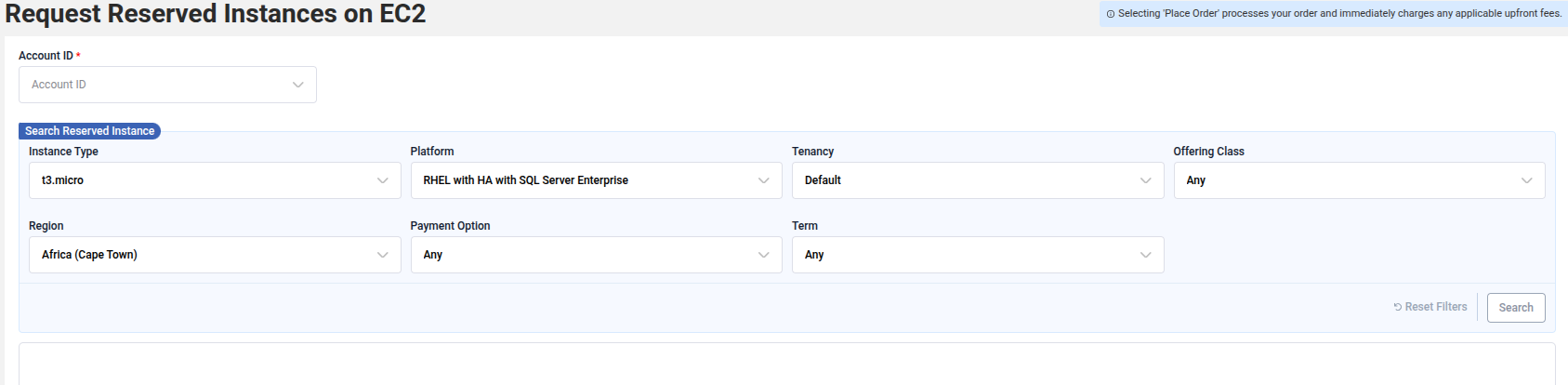
If your reservation is nearing expiry or you want to purchase more capacity, you can Request Reserved Instances directly from the page (depending on your contract). The Request Reserved Instances section lets you search for different types of Reserved Instances based on instance class, deployment option, product description, and region.
This feature makes it simple to add or renew reserved instances, ensuring you maintain cost-effective usage of your cloud resources. If you need guidance on what to purchase, the CloudKeeper team can provide a detailed report analyzing your workloads and recommending the best RI or Savings Plan strategy.
Active vs Expired Reservations
The Reservation Summary page distinguishes between Active and Expired reservations. Active reservations are those that are still valid, while expired reservations have already passed their term. It’s important to keep track of these to ensure that you are not losing out on benefits from your Reserved Instances.
- Active Reservations: Currently in use and are still valid.
- Expired Reservations: Past their expiration date. You may need to renew or purchase new instances.
Both active and expired reservations are listed, and you can take appropriate actions such as renewal or modification as needed.