Reservation Utilization
The Reservation Utilization page provides insights into how effectively your Reserved Instances (RIs) are being utilized. This helps identify underutilized Reserved Instances, allowing you to optimize your cloud spend by adjusting your Reserved Instance purchases or usage patterns.
Key Features of Utilization Page
- Utilization Percentage: This metric shows the percentage of your Reserved Instances' capacity that is being used. A high utilization percentage indicates that you're making full use of your Reserved Instances, while a low percentage suggests that you're not fully utilizing your reservations.
- Total On-Demand Cost: This shows the total cost incurred from On-Demand instances. If the utilization is low, more On-Demand instances may be used, leading to higher costs.
- Average Utilization: This indicates the average utilization over a defined period. It gives you a quick overview of your Reserved Instances’ effectiveness over time.
Utilization Insights for Different Services
The Utilization page tracks Reserved Instance usage across various services such as EC2, RDS, Redshift, ElastiCache, OpenSearch, and Savings Plans. The utilization percentage helps identify which services are making good use of Reserved Instances and which might require adjustments.
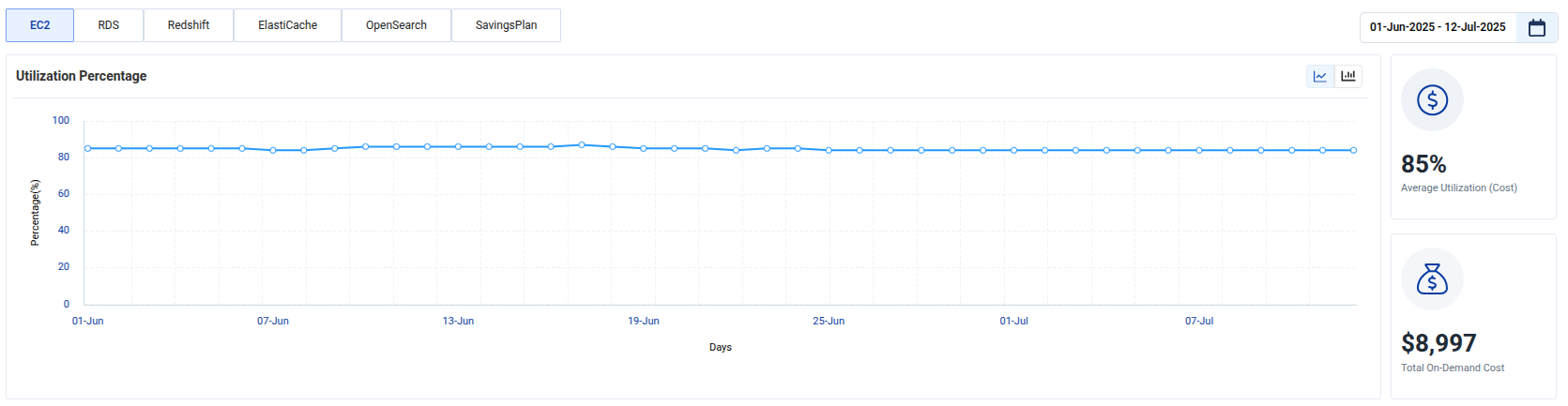
Example: EC2 Utilization
Here is an example showing EC2 utilization over time. The chart tracks utilization percentage, which helps users understand whether the Reserved Instances are being used efficiently.
Utilization Details for Reserved Instances (RIs)
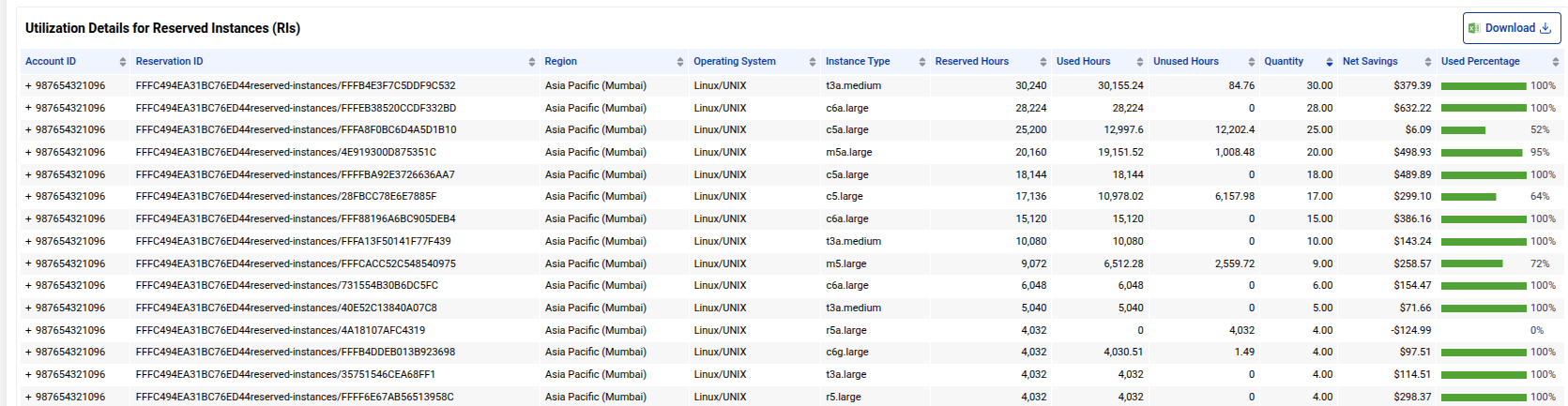
This section shows the detailed breakdown of how Reserved Instances are being utilized across different services, regions, and instance families. It helps you identify the areas where you're getting the best value from your RIs and where adjustments might be needed.
- Account ID: The AWS account associated with the Reserved Instance.
- Reservation ID: A unique identifier for the Reserved Instance.
- Region: The region in which the Reserved Instance is deployed.
- Operating System: The operating system used by the Reserved Instance (e.g., Linux, Windows).
- Instance Type: The type of instance (e.g., t3.medium, m5.large).
- Reserved Hours: The total number of hours your Reserved Instance is available for.
- Used Hours: The actual number of hours the Reserved Instance was in use.
- Unused Hours: The hours that were available but not used, indicating underutilization.
- Quantity: The number of instances covered by the RI
- Net Savings: The savings from using Reserved Instances instead of On-Demand instances.
- Used Percentage: The percentage of the Reserved Instance that has been utilized.
This helps you track underutilized instances and make adjustments accordingly.
Tracking Utilization for Different Services
You can monitor the utilization of Reserved Instances for different services such as EC2, RDS, Redshift, ElastiCache, and Savings Plans. This provides a holistic view of your Reserved Instance usage across services and regions.
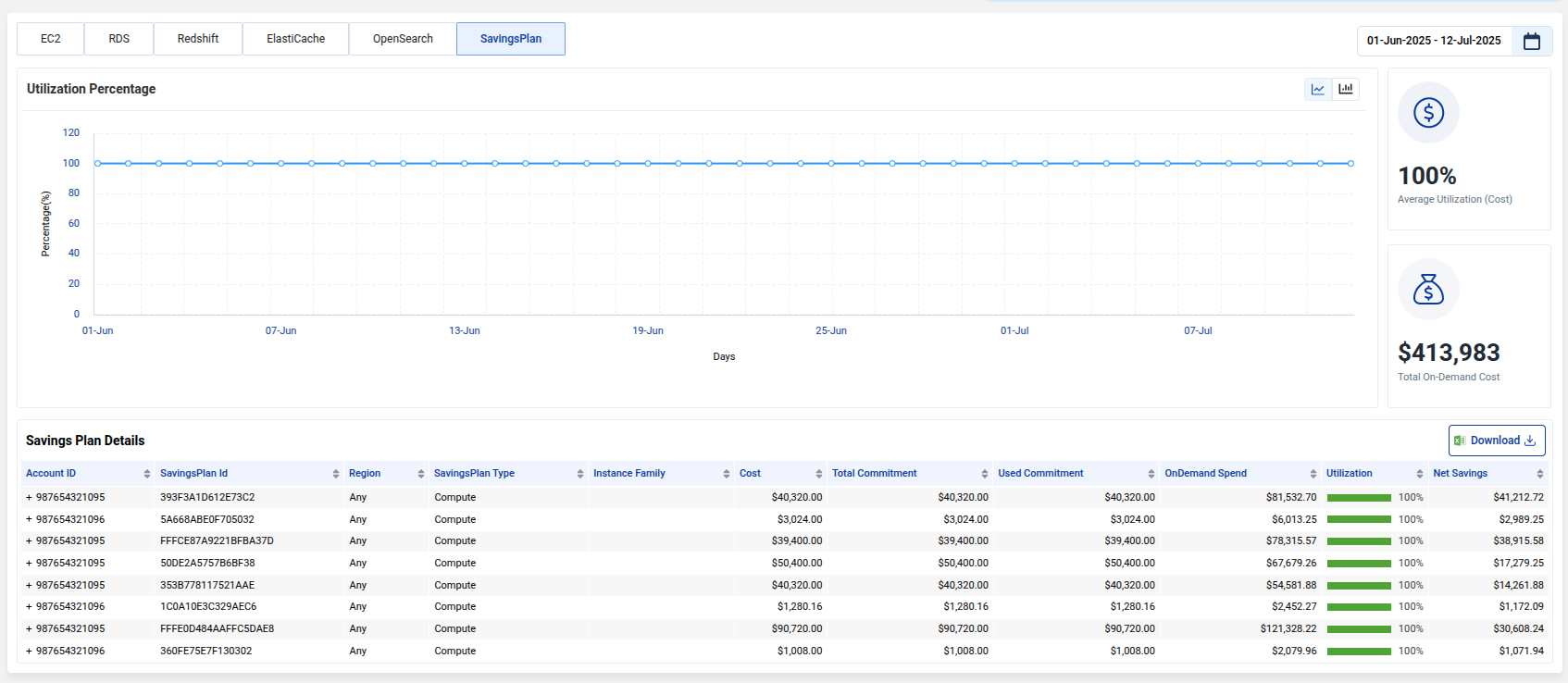
Example: SP Utilization
Tracking SP utilization helps ensure that your committed spend is fully leveraged, maximizing cost savings.