Snoozed Recommendations
The Snoozed Recommendations section displays all recommendations that have been temporarily deferred by the user.
This feature allows you to pause actions on specific recommendations while keeping them for later review.
For resources that are kept for compliance, used only occasionally, or needed for DR purposes, you can snooze the recommendations. This way, your dashboard shows only actionable items, avoids false positives, and still lets you revisit all snoozed resources anytime through the Snooze List.
Overview of Snoozed Recommendations
When you snooze a recommendation, it is removed from the active list and moved to the Snoozed tab.
From this section, you can:
- View all snoozed recommendations.
- Review details such as the resource, type of recommendation, reason for snooze, and date snoozed.
- Choose to unsnooze a recommendation to make it active again.
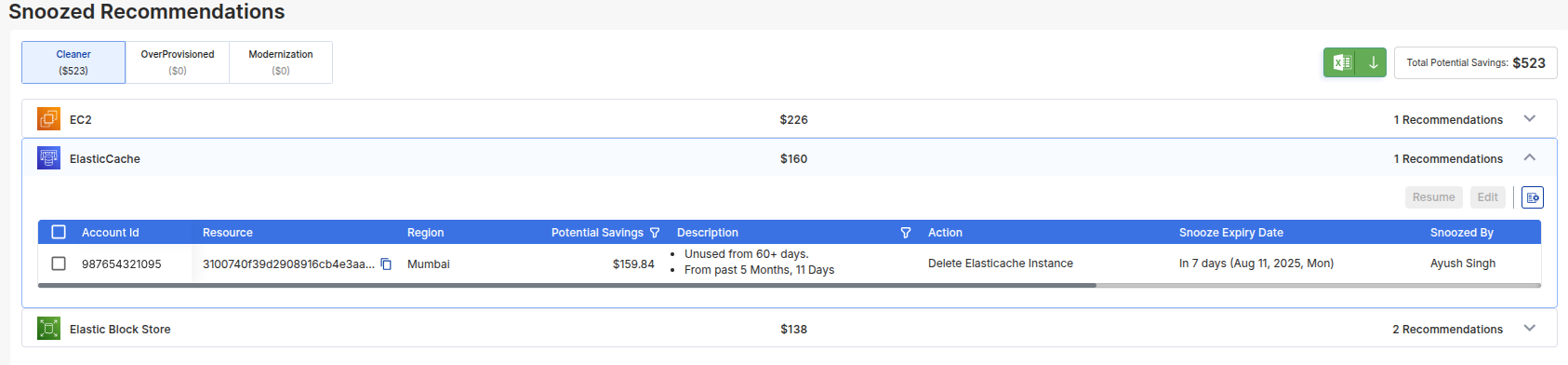
If there are no snoozed items, the dashboard will display a blank state indicating that no recommendations have been deferred.
Key Features
- Centralized List: All snoozed items are visible in one place.
- Unsnooze Option: Reactivate snoozed recommendations with a single click.
- Deferred Review: Ideal for recommendations requiring approval or further investigation.
The Snoozed Recommendations page ensures that no optimization opportunity is lost, even if actions are postponed temporarily.